>>

3

Download

Get Official Dominican Republic ID Card Photo at Home! (51 x 51 mm)

This Dominican Republic ID card photo maker helps you get a fully compliant ID card photo with just a few clicks!
Document

Dominican Republic Id Card Photo

Size51 x 51 mm (5.1 x 5.1 cm)
Resolution600 dpi
BackgroundWhite
Upload Photo
QR Code

Scan the QR code to Upload a Photo From your Mobile.

Now, you can also create your passport photos on your mobile with a single tap.

Install and Create Passport photo

Apple Download

DO's and Don'ts

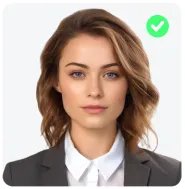
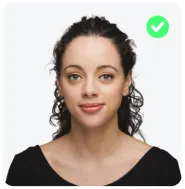
Neat and Tidy

Neat and Tidy

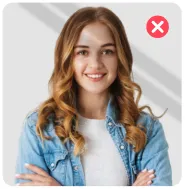
Do not Smile

Do not Smile

Head At Center

Head At Center

Avoid Shadows

Avoid Shadows

Look Straight

Look Straight

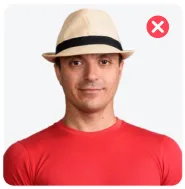
No Headgear

No Headgear

#FFFFFF

Source Photo:

Source
Loading

Checking Your Photo...

Complies With Standards
Country icon
Document icon
  • Face Is Clearly Visible And Recognisable
  • Image Is Sharp And Good Quality
  • Photo Is Suitable For Reliable Image Generation
  • Head Position Is Suitable For Processing
  • Face Is Directly Facing The Camera
  • Subject Is Clearly Identifiable
Loading

Step 1 Of 2. Choose A Plan

Passport Photo Is Ready To Use.

Globally Accepted & Fully Country Compliant Standards

Choose Your Photo Format

Please agree to the Terms of Service and Privacy Policy

After The Payment Is Processed, The Photo Will Be Available For Download

SSL-Secured Payment

Locked preview
Pay To Unlock
0%

Wait 00:01:00

Pay To Unlock

Our Photos 100% Meet International Government Standards

Your Photo Will Automatically Download After A Short Delay.

Dominican Republic ID Card Photo Requirements

To get instant approval for your Dominican Republic ID card photo, follow these essential requirements listed below!

51 mm
Photo Dimensions26 - 35 mm (50-69%)29 - 35 mm (56-69%)
Recent Photo

Recent Photo

Taken within 6 months.

Background

Background

Must be plain white.

Size and Dimensions

Size and Dimensions

51 x 51 mm (5.1 x 5.1 cm)

Resolution

Resolution

Minimum 600 dpi required.

Photo Quality

Photo Quality

Clear, no creases or marks.

Face Visibility

Face Visibility

Entire face must be fully visible.

Face Orientation

Face Orientation

Face straight, no tilt.

No Red-Eye

No Red-Eye

Red-eye effect not allowed.

Frequently Asked Questions
Everything you need to know about the product and billing.

It’s not recommended. Front cameras usually produce lower-quality images, which may reduce the chance of approval. If you choose this option, make sure the photo is bright, sharp, and free of filters.

Yes. Natural-looking makeup is allowed as long as it doesn’t change your facial features.

Yes. Sitting is perfectly fine as long as your head is upright, straight, and centered.

Unlimited. You can upload and retry as many times as needed until you are satisfied with the results.

Appearance
Close
0%
0%
Alert icon

Background color is not country-compliant. Revert Changes or proceed.

Alert icon

Background color is not country-compliant. Revert Changes or proceed.

0%
0%