>>

3

Download

Portugal Passport Photo Maker (35x45 mm) - Digital & Print-Ready in One Click!

Create a Portugal passport photo at home with our online tool. It auto-crops your photo to 35 × 45 mm and ensures compliance with official requirements.
Document

Portugal Passport Photo

Size35 x 45 mm (3.5 x 4.5 cm)
Resolution600 dpi
BackgroundLight Grey
Upload Photo
QR Code

Scan the QR code to Upload a Photo From your Mobile.

Now, you can also create your passport photos on your mobile with a single tap.

Install and Create Passport photo

Apple Download

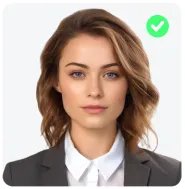
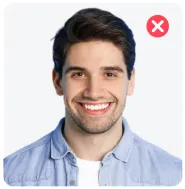
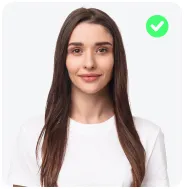
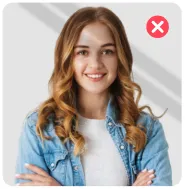
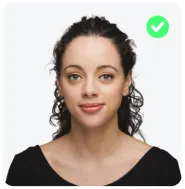
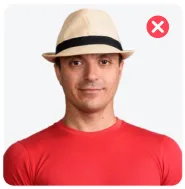
DO's and Don'ts

Neat and Tidy

Neat and Tidy

Do not Smile

Do not Smile

Head At Center

Head At Center

Avoid Shadows

Avoid Shadows

Look Straight

Look Straight

No Headgear

No Headgear

#FFFFFF

Source Photo:

Source
Loading

Checking Your Photo...

Complies With Standards
Country icon
Document icon
  • Face Is Clearly Visible And Recognisable
  • Image Is Sharp And Good Quality
  • Photo Is Suitable For Reliable Image Generation
  • Head Position Is Suitable For Processing
  • Face Is Directly Facing The Camera
  • Subject Is Clearly Identifiable
Loading

Step 1 Of 2. Choose A Plan

Passport Photo Is Ready To Use.

Globally Accepted & Fully Country Compliant Standards

Choose Your Photo Format

Please agree to the Terms of Service and Privacy Policy

After The Payment Is Processed, The Photo Will Be Available For Download

SSL-Secured Payment

Locked preview
Pay To Unlock
0%

Wait 00:01:00

Pay To Unlock

Our Photos 100% Meet International Government Standards

Your Photo Will Automatically Download After A Short Delay.

Portugal Passport Photo Requirements

Portugal has specific rules for passport photos. It’s important to make sure your photo meets these rules before submitting your application! You can find all the details below.

35 mm (826px)
Photo Dimensions23 - 31 mm (50-69%)25 - 31 mm (56-69%)
Recent Photo

Recent Photo

Taken within 6 months.

Background

Background

Light Grey

Size and Dimensions

Size and Dimensions

35 x 45 mm (3.5 x 4.5 cm)

Resolution

Resolution

Minimum 600 dpi required.

Photo Quality

Photo Quality

Clear, no creases or marks.

Face Visibility

Face Visibility

Entire face must be fully visible.

Face Orientation

Face Orientation

Face straight, no tilt.

No Red-Eye

No Red-Eye

Red-eye effect not allowed.

Frequently Asked Questions
Everything you need to know about the product and billing.

No, selfies are not accepted. Front-facing cameras tend to distort facial features (the "fisheye" effect), which can interfere with biometric software. Instead, use a tripod or ask someone to stand about 1.5 meters (5 feet) away while keeping the camera at your eye level.

There is no formal dress code, but you should wear your everyday clothes (no uniforms). Since the background is light grey, avoid wearing white or light grey tops. You’ll blend into the background, creating a "floating head" effect. So, try to wear a darker or contrasting color.

This is the most stressful one for parents! The easiest way is to lay your baby on their back on a plain, light-colored sheet. Take the photo from directly above. Make sure no hands (yours or theirs), toys, or pacifiers are in the frame. Their eyes should ideally be open.

Review the rejection reason, retake the photo correcting that issue (lighting, background, head tilt, etc.), and re-upload that photo to this photo maker.

Appearance
Close
0%
0%
Alert icon

Background color is not country-compliant. Revert Changes or proceed.

Alert icon

Background color is not country-compliant. Revert Changes or proceed.

0%
0%